Which key a request uses
Departments draft with an AI model. Today the provider is Anthropic: drafts are written by Claude, Anthropic's model, and more providers may come. Each request uses, in this order:
- your unit's own Anthropic key, when a lead has set one;
- otherwise CitiDev's key;
- otherwise no key: the department writes a template draft and calls nothing.
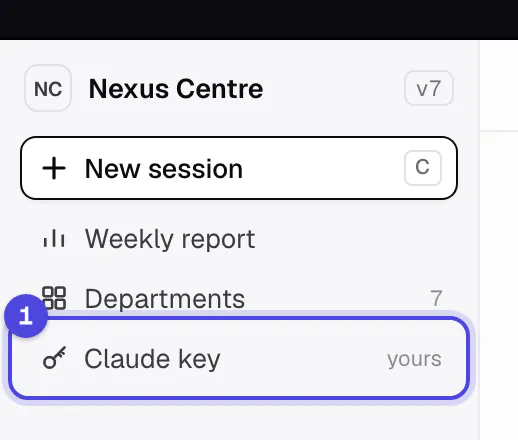
The Lead view's sidebar shows the key in use: yours, CitiDev or none.
Set, replace or remove the key
On the AI key page, Claude key and usage, at nclerk.com/s/ followed by your workspace and /settings, a lead pastes the key and presses "Save", or "Replace" when one is set.
- The key is checked with Anthropic before it is stored. A key Anthropic refuses is not stored.
- It is stored encrypted. Only its last 4 characters are ever shown, with who set it and when.
- "Remove" deletes it. Requests then use CitiDev's key, or template drafts if there is none.
- If Anthropic refuses the key later, drafting fails and the page says the key failed its last check. Set it again.
Team members see which key is in use but cannot change it.

Usage
The same page shows what the AI model cost this month: totals, cost by day, by department, by key and by model, the most recent calls, and earlier months. It shows counts and costs only, never the text of a request or a draft. Template drafts make no call and cost nothing.
The printable monthly report, at nclerk.com/r/ followed by your workspace, shows the month's usage and sessions. See Reports.
The monthly budget
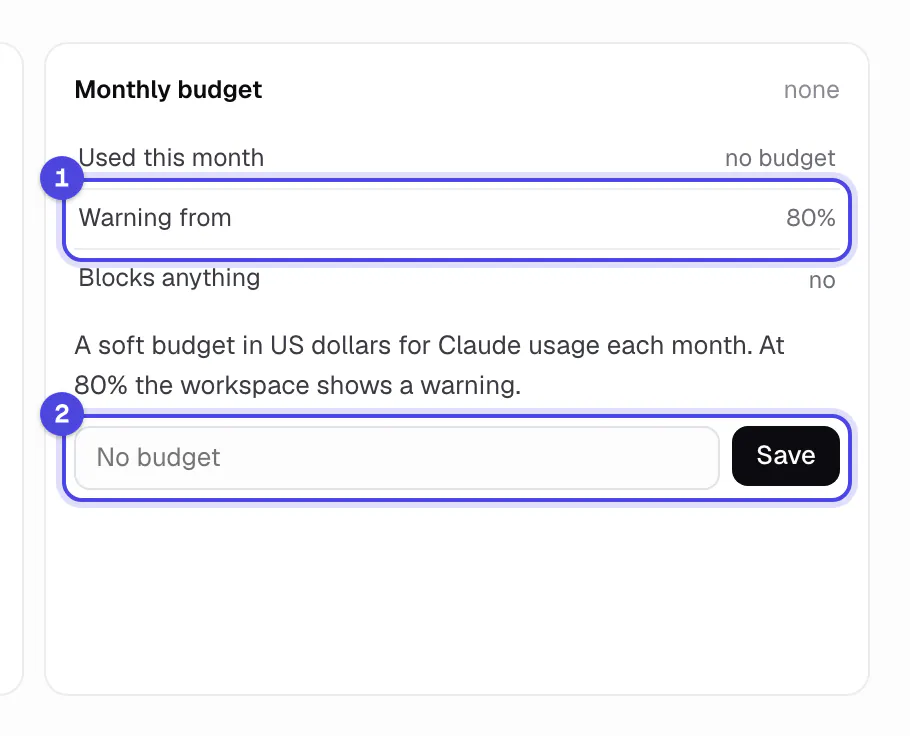
A lead can set a monthly budget in US dollars. At 80% of it, the workspace shows a warning. It blocks nothing: requests keep running past it. Leave it empty for no budget.
Something here does not match what you see? Tell your CitiDev contact.